Building trust before asking for commitment
Digital Identity Manager was Experian Partner Solutions’ first “try-before-you-buy” product. It gave people a free scan that showed users where it found their personal information exposed online, and then offered paid automated removal.
Partners wanted strong engagement to drive conversions, and my initial brief reflected that: a focus on selling. Once I got into the work, I saw that pushing too hard in a category that already made people nervous would backfire. I argued for a slower ramp: let people see real value first, then ask them to upgrade.
I led the design of Digital Identity Manager from concept through launch. The product showed that a value-first approach could beat hard-sell tactics. It brought in millions in B2B revenue and kept churn below 1%. The free scan itself saw 40% engagement.

The platform's first try-before-you-buy product
Experian Partner Solutions had never offered a free sample before. Digital Identity Manager would scan 80+ people-finder sites to show existing customers their exposed personal information, then convert them to paid continuous monitoring and automated removal.
Users had no idea their personal data was being sold online
People-finder sites made it trivially easy for identity thieves to access detailed profiles—addresses, phone numbers, relatives, property values—with just a name and city. These data brokers collect, store, and sell personal information from public records, making users vulnerable to fraud and identity theft. But users were unaware of these sites or that their information was being actively sold.
The Challenge
Partner business goals vs. user trust
The brief was to create a new identity protection product with a free scan and a clear path to upgrade. Partners were eager to drive revenue, but I knew aggressive conversion tactics would backfire in the trust-sensitive world of identity protection.
Users were unaware of people-finder sites or the threat they posed. We needed to spark awareness and curiosity without triggering skepticism.
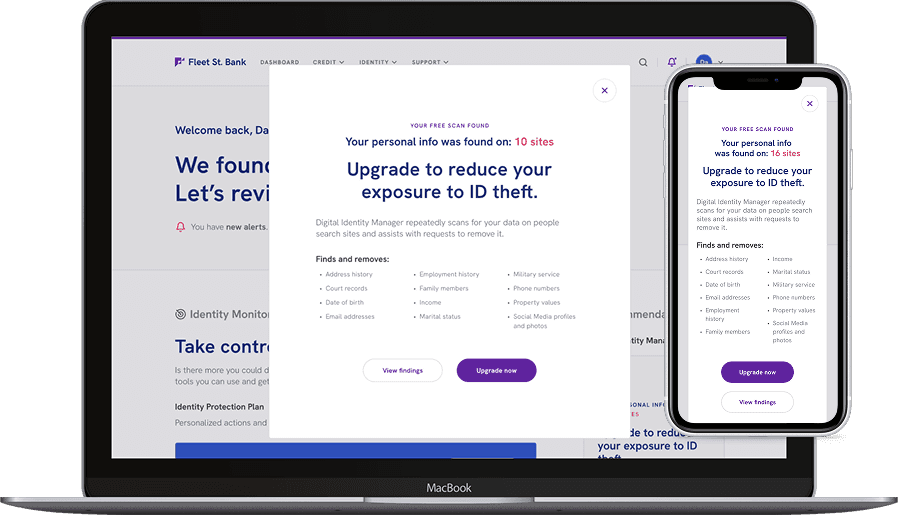
Returning user modal
My Product Owner initially asked that a modal be the user experience for new users. I found it too aggressive for new users and instead leveraged it for returning users who engaged with the scan. Partners can customize the frequency and duration of its use.
My Role
I led the end-to-end design process. My work included:
Clarified the problem space and third-party vendor capabilities
Defined what the product would include and mapped the key user flows
Wrote a large portion of the user-facing copy
Created the interface design and design system components
Ran usability testing (in collaboration with a senior researcher)
Oversaw handoff to development
I also fostered cross-functional alignment with the Product Owner, advocating for a trust-first approach that prioritized user education over immediate upselling.
the design
Designing to earn trust
Abstract risk explanations fell flat with users. In testing, people skimmed right past them. What did catch their attention was seeing their own data exposed in a free scan, so we built the experience around that moment. Through two rounds of testing, we uncovered three drop-off points standing between users and conversion. Each required a fundamentally different approach to overcome.

Dashboard right rail card
Before opting into the free scan, a card on the dashboard includes a call to action and a link to more information.

Product page pre-scan
The "Learn More" link directs you to the product page, where you can find additional information.

Free scan results
After the user opts into the scan, the product displays a static set of results, the value proposition of the paid version, and a CTA.
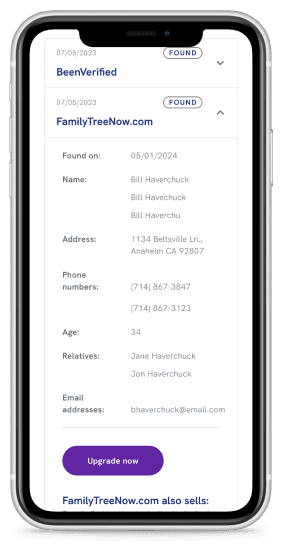
Scan findings details
Expanding one of the accordions displays all of the user's information on the people-finder sites.
From invisible to irresistible
Users overlooked the dashboard card CTA
In Round 1 unmoderated testing, only 4 out of 29 participants (14%) selected the free scan widget as their first choice on the dashboard. The right-side widget format wasn't capturing attention, and my initial approach of explaining what DIM was upfront fell flat. Abstract explanations didn't move anyone to click.
I made curiosity the primary driver
Rather than making the placement more aggressive, I focused on making the widget more compelling. I created curiosity that pulls users in, rather than pushing information at them.
Before
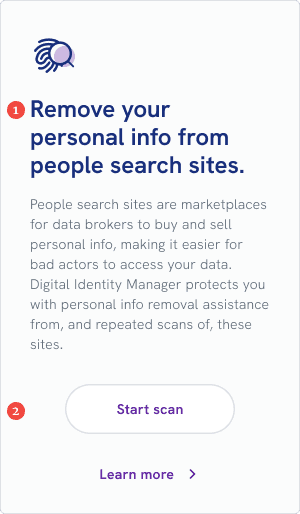
1
The headline lacks context
2
The button is difficult to see, and the button text is not compelling
After
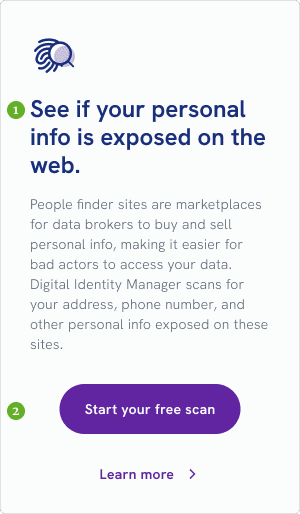
1
The headline is intriguing even without context
2
Easy-to-see button with compelling text
Key Changes:
Headline: From instructive "Remove your personal info..." to curiosity-driven "See if your personal info is exposed"
Copy: From abstract threats to specific data types (address, phone number, relatives)
Button: Made visually prominent with the word "FREE" front and center
Removed premature selling: Cut reference to premium features before users understood the problem
Validation
In Round 2 testing, all participants engaged with the free scan (up from just 14% in Round 1). Curiosity worked better than explanation. Users appreciated seeing value demonstrated before being asked to commit.
“
I like that there is an option to see what information is available for free to really demonstrate how much could be out there and the option for upgrading...and have someone handle it for you.
”
–Participant 3, Florida
Making the threat feel real
Users didn't understand the significance of their exposed data
Users saw their exposed data in scan results, but didn't understand what it meant. The original messaging focused on product features (monthly scans, automatic removals) rather than user impact. The way we described the product hid the personal consequences.
Participants could see their information was "found" on people-finder sites, but the significance didn't register. Without understanding the threat, they had no motivation to upgrade.
I reframed around personal consequences instead of product features
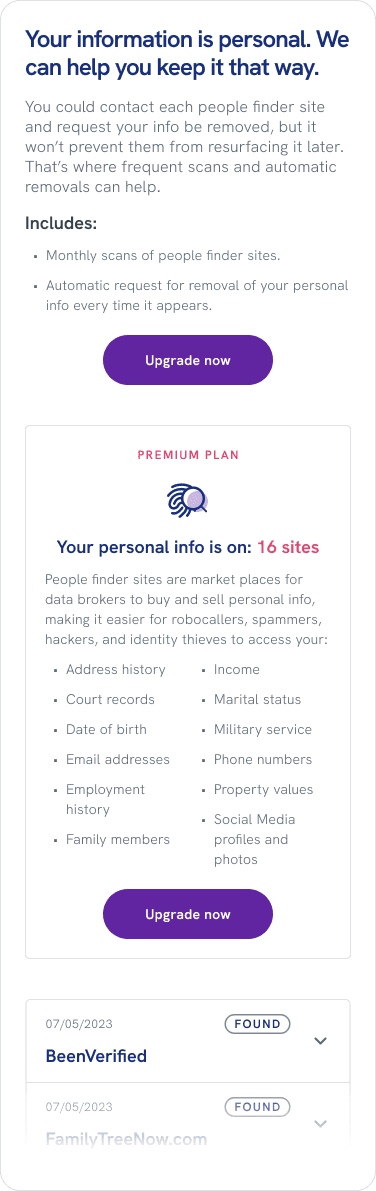
I removed the feature-focused "Includes" section and restructured the page to lead with personal impact. The intro emphasized consequences users experience daily: reducing robocalls and spam emails, safeguarding against identity theft.
I also moved the list of exposed data types (addresses, phone numbers, employment history) to a more prominent position, directly below the personal impact statement. We moved the bulleted list to create a clear connection: here's what happens to you → here's what's exposed → here's how criminals use this information.
We saw stronger reactions when we framed the risk in terms of everyday annoyances. Robocalls and spam are familiar to everyone, and once people connected those to their exposed data, the rest of the message landed.
Before
After
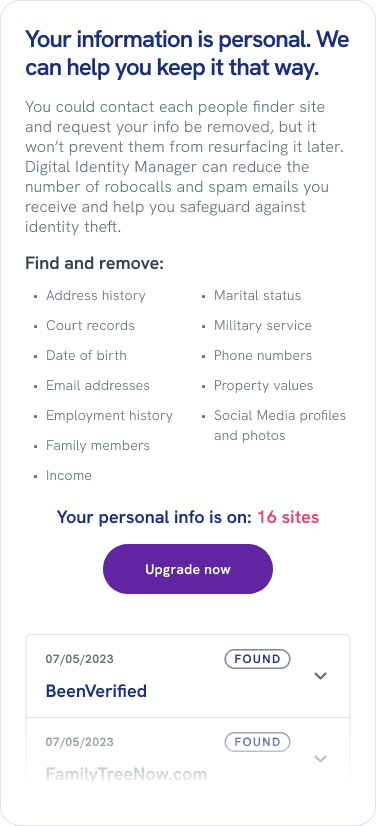
Replaced feature description (frequent scans and automatic removals) with personal benefit (reduce the robocalls and spam emails).
Replaced feature description bullets with a list of personal data types. And moved them to a higher position.
Reduced the amount of text.
Validation
Testing confirmed that connecting exposed data to personal consequences created immediate motivation to act.
“
I felt confident in the information that was being provided to me, it made me feel like there was something immediate I could do to change my cyber security in a positive way.
”
–Participant 4, Illinois
From confusion to clarity
Users missed the key benefit of upgrading
In Round 2 testing, 60% of participants didn't understand what they'd get by upgrading to premium. They thought it meant:
Access to more detailed scan results
Ability to scan additional people-finder sites
Different types of data searches
They missed the actual benefit: automatic removal of their data, not just viewing what was exposed.
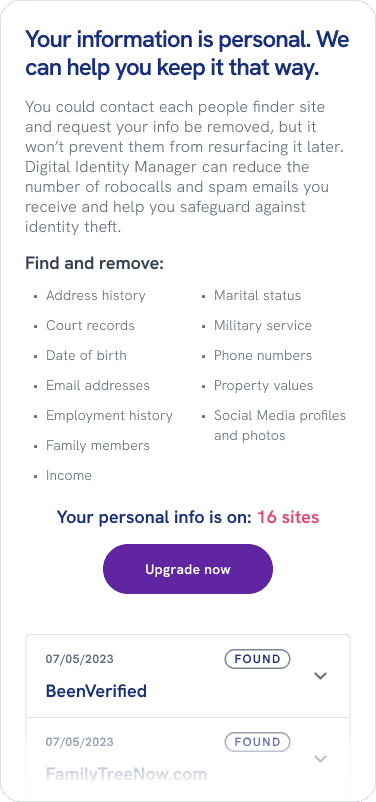
This confusion was partly my own doing. In Decision 2, I'd successfully shifted focus from product features to emotional impact—helping users understand the threat. But I'd overcorrected, burying the practical benefits too deeply. Users now needed to see what upgrading would do for them clearly.
I balanced emotion with explicit benefit statements
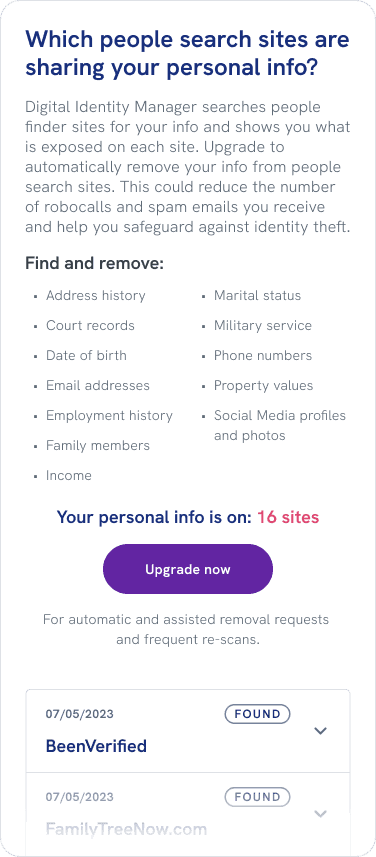
I redesigned the upgrade messaging to make the key benefit impossible to miss—pulling back from the purely emotional approach to be more explicit about the practical value.
Before
After
Key Changes:
Question-based headline: "Which people search sites are sharing your personal info?" framed the upgrade as answering a specific question users now cared about
Balanced emotion with clarity: Kept the relatable consequences (robocalls, identity theft) but made the solution mechanism clearer
Explicit benefit statement: Added "For automatic and assisted removal requests and frequent re-scans" directly below the CTA to remove any ambiguity about what upgrading actually does
Validation
The clearer messaging helped users understand the value proposition and feel empowered by the offering.
“
I really liked how the site was giving me the tools and information I needed to feel like I have control over my identity and that I can control who has my personal information.
”
–Participant 7, New York
UNEXPECTED CHALLENGE
When data brokers fought back
Networks started blocking automated removals
Just as I was wrapping up, two people-finder networks started blocking our automated removal requests. They required users to prove ownership by validating their email directly on the network's site. This change created two immediate design challenges. I needed to help users understand the difference between regular sites (where automated removal still worked) and network sites (which required manual validation), and then guide them through the validation process on an external site we didn't control.
Before
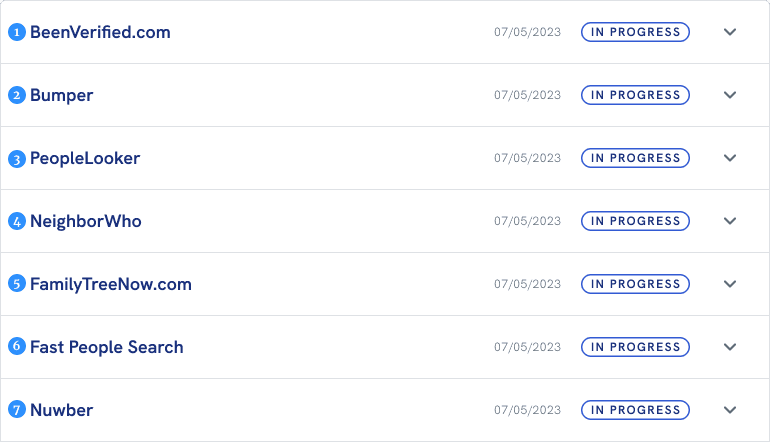
1
Network
2
Network owned
3
Network owned
4
Network owned
5
Non-network
6
Non-network
7
Non-network
Guiding users through network sites
Rather than overhauling the entire design, I created a nested version of our existing accordion pattern. I grouped network sites and their children into parent containers with "action needed" status, accompanied by links and step-by-step validation instructions. This structure helped users understand that a single validation would affect multiple sites within a network, making the manual process feel less overwhelming while remaining consistent with the existing design system.
After
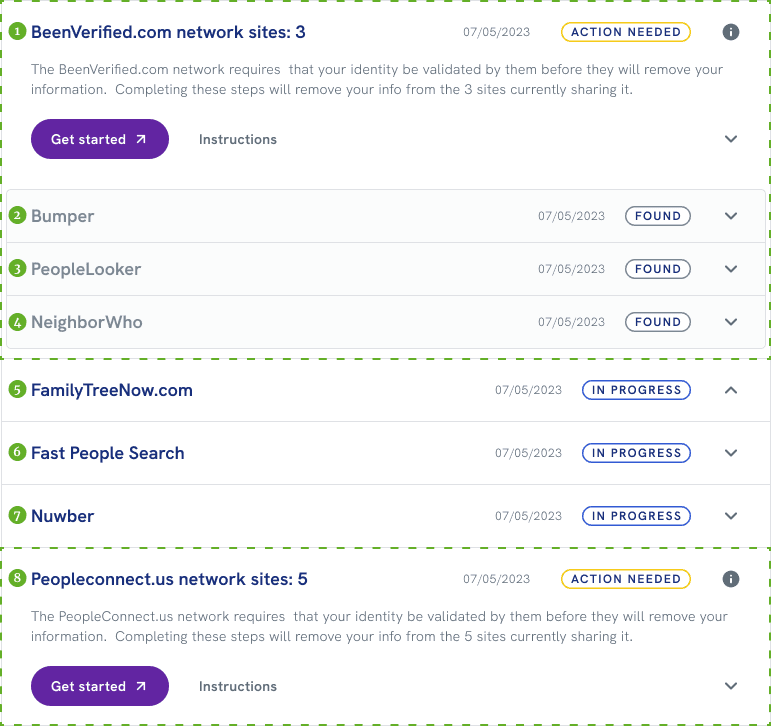
1
Network parent (BeenVerified.com), user not verified, 3 child sites expanded
2
BeenVerified.com network child
3
BeenVerified.com network child
4
BeenVerified.com network child
5
Independent site
6
Independent site
7
Independent site
8
Network parent (Peopleconnect.us), user not verified, 5 child sites not expanded
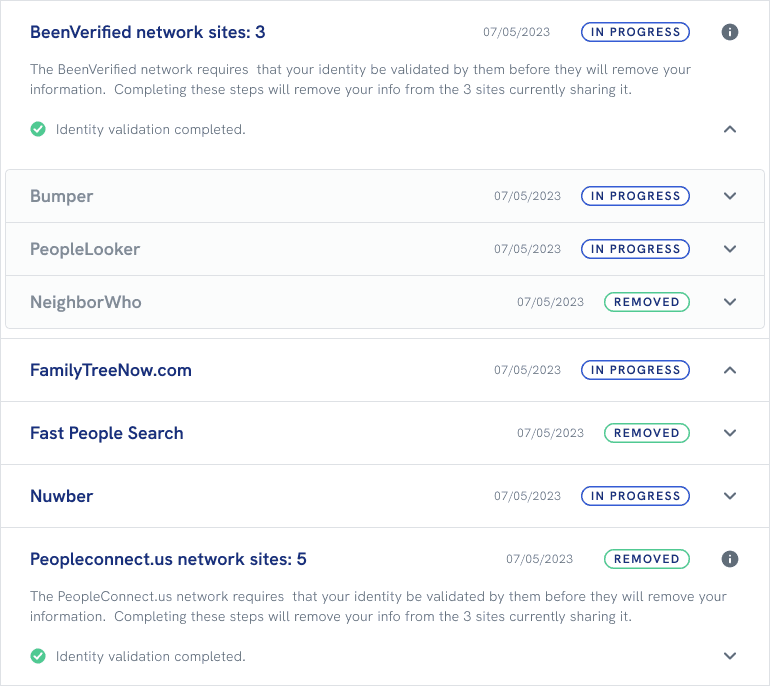
Status remained stuck on 'action needed’
Even with clear instructions in place, I realized we had a basic technical problem: the email validation happened entirely on the people-finder network's site, not in our system or our vendor's API. Because the validation happened outside our system, we had no direct way to know when a user was done.
Using re‑scans to infer status
I realized that since we continuously re-scanned all sites, if our scan showed data removed from even one child site in a network, the validation must have been completed. I worked with developers to implement logic that inferred the parent network's status based on removal patterns across child sites. When all child sites showed removal, the parent status automatically updated to "completed"—giving users the closure they needed without requiring direct system integration.
IMPACT
What the trust-first approach delivered
Digital Identity Manager launched as Experian Partner Solutions' first try-before-you-buy product, generating millions in B2B revenue through partner adoption. It showed value first, then asked for commitment, and that approach worked for both users and the business.
User Engagement
40% interaction rate with free scan
The curiosity-driven approach successfully motivated users to engage with the free scan experience, transforming abstract privacy concerns into tangible awareness of personal data exposure.
8% conversion from free to paid
By building trust through demonstration rather than aggressive selling, users who saw their exposed data were motivated to upgrade for continuous protection and automated removal.
Product Performance
<1% churn rate
Fewer than 100 service calls across the entire user base demonstrated that the experience was intuitive and met user expectations, resulting in exceptional retention.
99% removal success rate
Automated and manual removal processes across 80+ people-finder sites proved highly effective, delivering on the product's core value proposition.
Business Value
Millions in new B2B revenue
Partners successfully adopted Digital Identity Manager, which showed that a trust‑first design approach could still deliver strong revenue.
A model we could reuse
The project gave us a model for converting free users to paid subscribers without sacrificing trust—a pattern we could reuse for future freemium products.
Conclusions
Takeaways
This project made the tradeoff between “help users” and “hit the numbers” feel less like a tradeoff. By giving people a clear look at their data exposed online, we saw engagement and conversion move in the right direction, and users told us they understood the risk much more clearly.
The experience worked best when we stopped treating risk as something to explain and instead built around a simple moment: here’s your data, where it’s showing up, and what we’ll do about it. That framing shaped the dashboard entry point, the results page, and the upgrade flow.
Digital Identity Manager didn’t need the full complexity of Identity Health Score. It needed a focused set of decisions: first, get people into the scan; then make the results meaningful enough that upgrading felt like the obvious next step.
Note: Specific metrics and internal data have been generalized to respect confidentiality agreements.